Pinpoint and Prevent Configuration Errors in Complex Hybrid and Multi-Cloud Networks
Prevent downtime by modernizing how you manage legacy Microsoft DNS/DHCP—without a rip-and-replace overhaul

THE REALITY
1:00 P.M.: A ROUTINE CHANGE. THEN SILENCE.
A network engineer pushes a DNS zone configuration update as part of a planned hybrid cloud migration project. Within minutes, alerts start to hit. Users can’t access internal apps. A cloud workload stops responding. The help desk queue fills up.
T+10 MINUTES: SERVICES FAIL
Four critical services are down. DNS queries aren’t resolving. The applications look fine. The network looks fine. But without DNS, nobody can get anywhere.
T+20 MINUTES: THE HUNT BEGINS
You open the Microsoft DNS console. Nothing obvious. You switch to Google Cloud Console. Still nothing. Someone pulls up an old IP spreadsheet and a homegrown record-tracking tool. Three tools deep and still no answer. Conflicting record? Overlapping range? A change that propagated in one place but not another? Nobody can see the full picture.
T+30 MINUTES: USER DISRUPTIONS
The help desk tickets continue to stack up. A regional sales team can’t access the CRM. A customer-facing portal is unreachable. Leadership wants an ETA on resolution, but you don’t even know where to start troubleshooting.
T+45 MINUTES: TEDIUM REIGNS
You finally narrow it down to a conflicting DNS record between the Microsoft-managed zone and Google Cloud—a collision neither tool flagged. You manually reconcile the records and push a fix. Services crawl back online.
T+60 MINUTES: CROSSING FINGERS
Everything looks stable. You send the “all clear.” But the fix was manual, and the root cause was a visibility gap. It could happen again at any time.
THE ACTUAL PROBLEM: OUTDATED MANAGEMENT CAN’T KEEP UP WITH HYBRID AND MULTI-CLOUD IT
Your expanding hybrid footprint didn’t create these problems, but it has exposed how fragile the old model for running DNS/DHCP has become. Years ago, it made sense to use the Microsoft DNS/DHCP bundled with Active Directory in Windows Server domain controllers at every site. It was convenient and “good enough” for a mostly on-prem world.
In today’s hybrid and multi-cloud environments, that model is a liability. Microsoft DNS/DHCP still runs on aging servers with their own consoles and scripts, isolated from the cloud-native DNS and IP address management (IPAM) tools you use elsewhere. The result is fragmented workflows, no authoritative source of truth and no easy way to automate changes or enforce consistent policy. As complexity grows, blind spots and conflicting records make outages both more likely and harder to diagnose.
Worse, these incidents are a symptom of a much larger issue: running mission-critical DNS/ DHCP and identity services side by side on the same aging servers is a major risk to business security and uptime. At some point, you’ll need to update that infrastructure to align with industry best practices for strict “separation of duties” between critical services.1

THE SOLUTION: MODERNIZE HOW YOU MANAGE MICROSOFT SERVICES TODAY, WHILE PREPARING FOR MORE STRATEGIC MIGRATION TOMORROW
Infoblox provides a unified control plane to manage foundational DNS, DHCP and IPAM everywhere—including on-prem Microsoft servers, public clouds and third-party external DNS—from a single pane of glass. You gain a single control point to automate changes and enforce IP address policy, minimizing conflicts and configuration errors. As a result, you can implement a more standardized and automated operational model better suited to modern IT environments right away, without having to overhaul the underlying infrastructure. Meanwhile, you can execute a more strategic migration away from legacy Microsoft DNS/DHCP incrementally, on your own timeline.
THE IDEAL
In this new world, a DNS configuration change is no longer a leap of faith. Instead of hand-editing records on each Microsoft server and hoping they don’t collide with something in Google Cloud, you push the update once, centrally, through Infoblox. Centralized policies validate the change against your authoritative IPAM and DNS standards before it’s pushed out to Microsoft and cloud environments. Conflicting ranges, duplicate records and out-of-policy updates are flagged or blocked before they hit production, so most “fat-finger” outages never happen.
On the rare occasions something does go wrong—a missed dependency, a downstream app issue—you’re not hunting through separate consoles and spreadsheets. Infoblox gives you a single, authoritative view of DNS, DHCP and IP usage across the hybrid environment, with clear flags where behavior diverged from policy. You can pinpoint and remediate the issue in minutes, often before users even realize there’s a problem.
WHAT THIS MEANS FOR THE ORGANIZATION
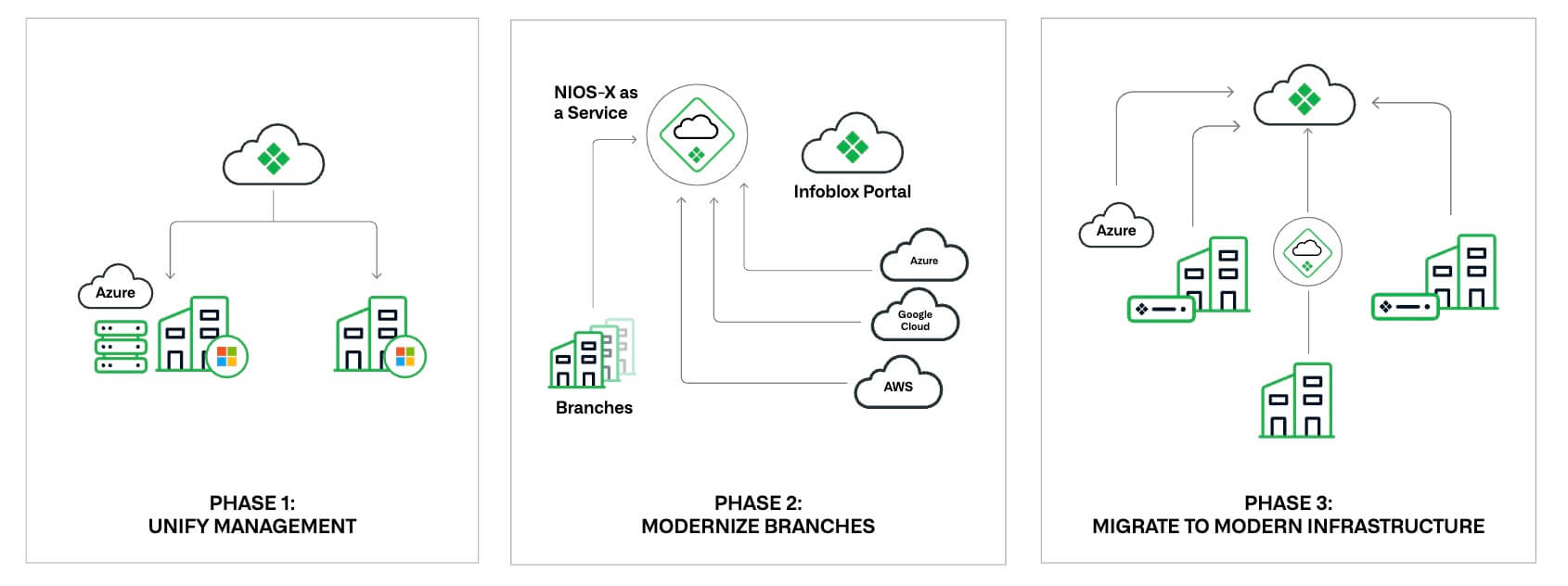
Modernizing management of Microsoft DNS/DHCP with Infoblox lets organizations move faster with new cloud and AI projects, without worrying whether the network can keep up. At the same time, they can pursue a phased modernization (Figure 1) of the underlying infrastructure toward best-practice critical service independence, without a risky, “big-bang” cutover.
THE BOTTOM LINE
Don’t let outdated management undermine your hybrid and multi-cloud business objectives. See how Infoblox keeps critical network services running—no matter how far or how fast your infrastructure scales.
PROOF POINTS
70% fewer remote site outages
Up to 85% improved productivity when deploying and managing remote sites
Up to 82% faster troubleshooting and problem resolution
30%+ productivity gains for SecOps teams investigating incidents
- NIST Special Publication 800-81-r3: Secure Domain Name System (DNS) Deployment Guide. Rose, Scott. Liu, Cricket. Gibson, Ross. National Institute of Standards and Technology (NIST). March 2026. https://nvlpubs.nist.gov/nistpubs/SpecialPublications/NIST.SP.800-81r3.pdf