- infoblox:blogs/tags/phishing-domain-detection
Tax-Themed Phishing Campaign
Tax-Themed Phishing Campaign. On 1 February, we observed a malspam campaign distributing a Hypertext Markup Language (HTML) file designed to steal email credentials from the recipient. The campaign’s email subject references tax documents. In the United States, it is not unusual to see campaigns using tax-related lures at this time of the year.

The Brief
Author: Nick Sundvall TLP: WHITE
Overview
On 1 February, we observed a malspam campaign distributing a Hypertext Markup Language (HTML) file designed to steal email credentials from the recipient. The campaign’s email subject references tax documents. In the United States, it is not unusual to see campaigns using tax-related lures at this time of the year.
Customer Impact
This is not a very sophisticated campaign; the threat actor only appears to be seeking to steal the victim’s email address and password. If the victim does not have multi-factor authentication enabled for their email account, the threat actor can use the stolen credentials to log in, allowing them to gain access to the victim’s emails and potentially take over the account.
Campaign Analysis
The threat actor used tax-themed email subjects to lure the recipient into opening the attached HTML file and input their credentials. However, the threat actor appears to have made a mistake with the names of the attached files, the subjects, and the spoofed sender address. They mostly refer to the Australian Tax Office (ATO) and Australian tax documents. The Australian tax season begins in July and ends in October.1
The names of the attached files included ATO Tax Invoice.html and eDocument Refund.html. Subjects of the emails included ATO 2020 Tax Payment plan and ATO TAX REFUND, while the email bodies were left blank. The sender address used @ato.gov.au.
Attack Chain
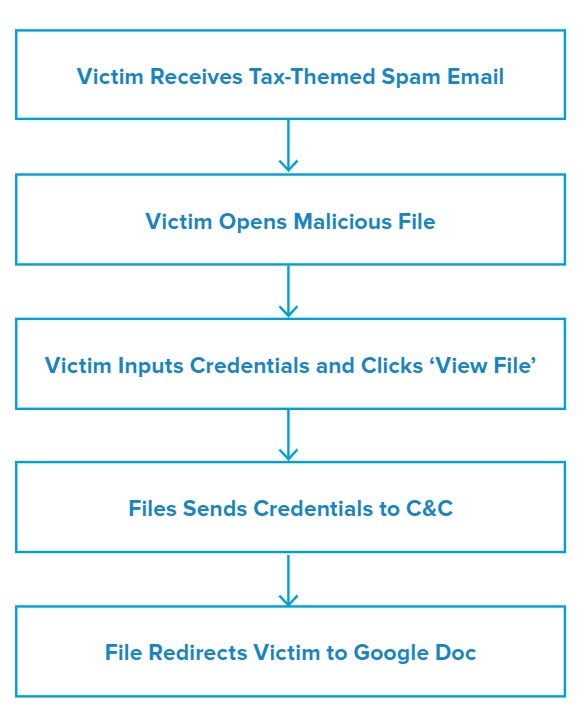
Upon opening the attached file, the victim will see a document that, depending on the recipient’s default settings, will be opened either with a web browser or with an application such as Adobe Acrobat. However, it is not on an actual website, but rather an HTML file. The background of the page is a blurred invoice with a prompt in the foreground for the recipient to input their email address and password to view the file. The prompt spoofs Adobe Acrobat, with Adobe ID written above the sign-in box and ‘Adobe Acrobat’ as the prompt title for all programs that open the HTML file.
When the victim types in a valid email address and password and clicks ‘VIEW FILE,’ the file then sends an HTTP Post request containing the credentials to the threat actor’s command and control (C&C) server.
Some browsers may provide the victim with a warning before typing in their credentials. During analysis, Firefox presented a box stating “The connection is not secure. Logins entered here could be compromised.”
After pressing ‘VIEW FILE’, the victim is redirected to a Google Doc webpage that states “Sorry, unable to open the file at present.” However, by this point the victim’s credentials have already been sent to the threat actor.
Vulnerabilities & Mitigation
Malspam email campaigns are a common distribution method for phishing scams. Infoblox therefore recommends the following precautions to avoid phishing attacks:
- Verify important or potentially legitimate attachments with the sender via alternative means (e.g. by phone or in person) before opening them.
- Regularly train users to be aware of potential phishing efforts and how to handle them appropriately.
- Always be suspicious of vague or empty emails, especially if there is a prompt to open an attachment or click on a link.
- Do not open attachments that are unexpected or from unfamiliar senders.