- infoblox:blogs/tags/domain-impersonation-threats
Reply-Chain Threadjacking Campaign Delivers Squirrelwaffle Loader and Cobalt Strike
Squirrelwaffle downloads a commercial penetration-testing product and uses it to deploy a program allowing attackers to carry out command execution, key logging, file transfer, and more.

Author: Seth Williams
Overview
On 13 September, security researchers discovered a malicious phishing campaign that uses reply-chain threadjacking to distribute a downloader known as Squirrelwaffle: an emerging threat that is delivered on the TR botnet and has the same infrastructure as that of the QakBot banking trojan.1
Customer impact
Squirrelwaffle downloads the commercial penetration-testing product Cobalt Strike and uses it to deploy Beacon:2 a program that lets attackers carry out command execution, key logging, file transfer, privilege escalation, port scanning, lateral movement, and other post-exploitation functions.3
Campaign analysis
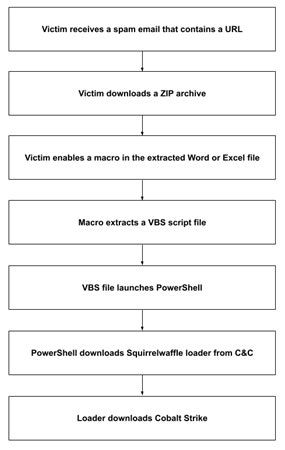
This campaign uses reply-chain threadjacking, where the malspam spoofs a legitimate user and impersonates a reply to an existing email. The same technique has been used in Emotet and QakBot campaigns.4 The body of the email contains a URL that, when clicked, downloads a ZIP archive containing a malicious Microsoft Excel or Word document named as diagram-{number}, where number is a set of random digits.
Attack chain
After extracting and opening the downloaded file, the victim is prompted to enable content. If the victim complies, the content runs a macro, which executes a VBS file via cscript.exe. This VBS file contains an obfuscated PowerShell script, which attempts to connect to one of several command and control (C&C) sites. Upon connecting, the script downloads Squirrelwaffle in the form of a DLL file: a loader that attempts to download Cobalt Strike.5
Vulnerabilities and mitigation
Malspam campaigns are a common distribution method for malware. Infoblox recommends the following precautions:
- Be cautious of emails from unfamiliar senders, and inspect all unexpected attachments before opening them.
- Always be suspicious of vague emails, especially those that include prompts to open attachments or click hyperlinks or hyperlinked text.
- Before clicking a hyperlink or hyperlinked text, pause the cursor over it to check the actual address. Alternatively, configure emails to be rendered as plain text rather than HTML.
- If accidental clicking of a hyperlink in a suspicious email immediately initiates an attempt to download a file, with a prompt for approval, do not allow the download. If the file is downloaded without a prompt, do not open the file—delete it immediately.
- Never configure Microsoft Office to enable macros by default. Many malware families use macros as an infection vector.
- Do not enable macros in a Microsoft Office attachment, especially if the file has little or no content apart from the directions for enabling macros.