- infoblox:blogs/tags/lookalike-domain-attacks
Fake Shipping Emails Deliver Ratty RAT
Fake emails appearing to come from DHL have been observed distributing Ratty, a remote access trojan. Learn more about this campaign and how to mitigate it.

Author: Avinash Shende
Overview
On 18 August, Infoblox observed a malicious email campaign distributing the remote access trojan (RAT) Ratty via weaponized Java files. Emails in this campaign have been made to appear to be coming from DHL, and they contain text that looks like shipping instructions. Ratty is an open-source Java RAT. It was made available on GitHub and was strongly endorsed on hack forums. Although Ratty’s original uploaders deleted the repository sometime in 2017, clones of Ratty exist.1
Customer Impact
Because Ratty’s source code is available on GitHub, its operators can easily add capabilities that let it:
- Run commands remotely
- Collect data
- Take screenshots
- Collect keystrokes to obtain login credentials and other sensitive data
- Record audio and video by using a microphone and a webcam2
Ratty can cause substantial damage to devices and data, and its victims have suffered financial loss, serious violations of privacy, and identity theft.
Campaign Analysis
Emails in this campaign appear to be coming from dhl_express@dhl[.]com, and they contain an attachment: a Java file called Shipment Details.jar. The From name in the emails is DHL EXPRESS, and the subject line is YOUR SHIPMENT DELIVERY DETAILS ATTACH. The body of the emails requests that recipients open the attachment to confirm their shipment details. The SMTP IP of the emails belongs to getopta.com, a legitimate website. This suggests that the emails are sent from a compromised email account.
Attack Chain
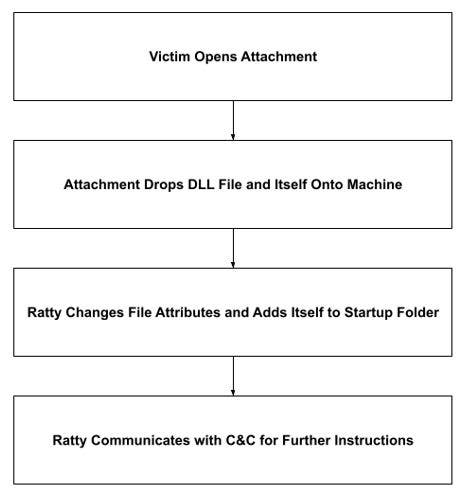
Ratty obtains supported languages, the computer name, and other data about a victim’s system. It then uses icacls.exe to change Java Usage Tracker’s access permissions to everyone. To achieve persistence, Ratty drops itself into the Startup folder, and to record keystrokes, it drops a DLL file called JNativeHook-FCBC1DC5993F3B7C153159E29CD4364927BC9517.dll into the Temp directory. To hide itself, Ratty changes its file attributes by using attrib.exe. Finally, Ratty attempts to connect to its command and control (C&C) IP on port 4040 and, if it succeeds, serves as a remote-controlled backdoor to the victim’s machine.
Vulnerabilities and Mitigation
Infoblox recommends the following actions for reducing the risk of infection by Ratty:
- Keep antivirus signatures and engines up to date.
- Turn on automatic updates, to keep the operating system up to date with the latest security patches.
- Do not expose email addresses to the internet.
- Do not open email attachments with extensions that look unfamiliar.
- Exercise caution when opening all email attachments, especially those that come from unfamiliar senders.
- Avoid opening emails with generic subject lines.