- infoblox:blogs/category/cloud
Introducing NIOS Swagger API with OpenAPI Specification: Faster Integration and Automation
Discover how Infoblox NIOS DDI now supports Swagger and OpenAPI standards, enabling faster API integration, automation and AI-ready workflows.

The Brief
In the evolving world of network automation, enabling developers to see and test API endpoints is no longer optional—it’s essential. To that end, we’re excited to announce a powerful enhancement: NIOS Swagger API support, which provides an easier way to discover, test and integrate Infoblox NIOS DDI APIs in your automation workflows. Infoblox NIOS DDI delivers, integrates and manages critical network services, such as DNS, DHCP and IP address management (IPAM), and provides visibility, automation, control and resiliency across hybrid, multi-cloud infrastructures. Starting with NIOS 9.0.6 (WAPI version 2.13.6), developers can explore and execute calls directly in the browser via Swagger UI, using OpenAPI specifications. It unlocks a more intuitive and interactive experience for developers and integrates NIOS APIs into continuous integration/continuous delivery (CI/CD) pipelines for faster and reliable deployments.
What Is the NIOS Swagger API and Why It Matters
The NIOS Swagger API brings industry-standard, machine-readable OpenAPI specifications to the NIOS WAPI endpoint, exposing interactive documentation and a built-in UI to try requests in real time—no client setup required. You can browse endpoints, understand request/response models and validate payloads on the spot, reducing the trial-and-error process that slows down integrations.
Traditionally, working with Infoblox’s NIOS WAPI requires consulting static documentation. With Swagger support:
- Developers can browse live API endpoints in a Swagger UI directly from their browser.
- The interactive documents reflect the latest API version, eliminating discrepancies between code and reference.
- You can test GET, POST, PUT, DELETE operations inline, without needing external tools.
- Automated tooling and client generation become possible via standard OpenAPI definitions, making it easier to integrate NIOS APIs into modern workflows.
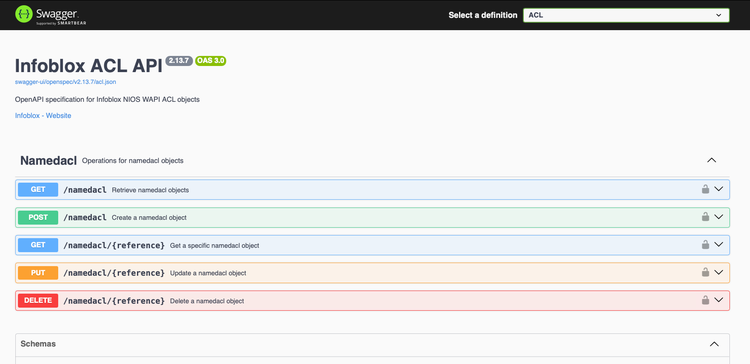
Figure 1. NIOS Swagger API for faster integration and automation
In short, we’ve moved from static reference to live, interactive documentation, improving usability and developer productivity.
How It Works and What’s Supported
NIOS WAPI endpoint now supports a Swagger-compliant specification. The key highlights are:
- The OpenAPI definition is versioned and updated in lockstep with each WAPI version.
- Swagger UI reflects available API paths, parameters, request/response models and example payloads.
- As endpoints evolve, deprecated methods are flagged, new methods are added and all changes show up in the UI.
- The swagger.json (or swagger.yaml) specification can be downloaded to be consumed by tooling (e.g., code generation, client SDKs).
The new capability is available across supported platforms and modes from the very first supported release (NIOS 9.0.6 / WAPI 2.13.6). If you’re on a newer version—such as NIOS 9.0.7—you’ll get the latest coverage and enhancements with the same familiar experience. No extra plug-in or extension is required—once your system is on that version or later, Swagger support is built in.
Key Benefits
- Instant Visibility and Reduced Onboarding Friction: Instead of flipping through documents or writing sample calls by guesswork, developers can immediately see available REST routes, input parameters and sample responses—all in one place.
- Faster Integration and Iteration: When building integrations, microservices or toolchains, the OpenAPI specifications empower you to auto-generate clients (Python, Go, Java, etc.). That means less manual coding, fewer mistakes and faster time to value.
- Automate Confidently in CI/CD and DevOps Integration: With machine-readable API definitions, teams can validate contracts, run integration tests or automate API evolution checks as part of CI/CD pipelines. The live Swagger document ensures your tooling stays in sync with real behavior.
- Versioning Clarity and Deprecation Awareness: Because the Swagger specifications evolve with each WAPI release, consumers can more clearly see which endpoints are new, changed or deprecated—minimizing surprise breaks during upgrades.
AI Advantages of Following OpenAPI Standards
The OpenAPI framework doesn’t just simplify human-driven development—it also lays the foundation for AI-driven automation and intelligent operations.
- Machine-Readable for AI Systems: Because OpenAPI specifications are structured and self-describing, AI agents and code assistants can automatically interpret endpoints, parameters and responses—enabling context-aware code suggestions, validation and testing.
- AI-Assisted Integration and Troubleshooting: AI tools can use OpenAPI data to auto-generate SDKs, detect version drift or even recommend fixes when integrations break.
- Smarter CI/CD and AIOps Workflows: With standardized schemas, AI-enhanced pipelines can perform predictive testing, change analysis and anomaly detection—helping teams anticipate issues before they reach production.
- Future-Proof for AI Interoperability: As enterprises embrace AI-powered orchestration, OpenAPI ensures NIOS APIs remain compatible with next-generation AI and automation platforms.
By adopting OpenAPI standards, Infoblox is making NIOS APIs not only easier for developers—but AI-ready for the future of intelligent automation.
Getting Started
- Upgrade your NIOS appliances to version NIOS 9.0.6 or higher to gain Swagger/OpenAPI support.
- Visit the WAPI Swagger UI endpoint (e.g., https:// /wapi/swagger/) to browse available APIs.
- Export the OpenAPI document (swagger.json or .yaml) to feed into your client generators or tooling.
- Start building or adapting integrations with confidence that your API reference always matches reality.
Conclusion
The addition of Swagger/OpenAPI support to NIOS WAPI (from 9.0.6 / WAPI 2.13.6 onward) marks a significant leap forward for API usability, developer efficiency and integration maturity. By bridging the gap between documentation and execution, teams can accelerate adoption of NIOS APIs, lower friction for automation and integrate tightly with CI/CD and DevOps workflows. Swagger API support is also available for Infoblox Universal DDI™, the industry’s most comprehensive, advanced and integrated portfolio for deploying and managing critical network services across hybrid, multi-cloud environments.
Whether you’re building new workflows or scaling existing ones, OpenAPI-powered documentation and Swagger UI make your Infoblox automation simpler, more consistent and easier to maintain over time. If you’re already on or planning to move to NIOS DDI or Universal DDI, we encourage you to explore the Swagger UI for your environment, export the OpenAPI specifications and begin embedding API workflows more confidently into your tooling and automation stack.
Quick Links