What if Your Analyst Could Just Ask? Connecting Tenable Findings to Infoblox Network Identity with MCP
Connect Tenable findings with Infoblox network identity through MCP to prioritize vulnerabilities, resolve asset visibility gaps, and investigate risk using AI.
The Missing Context behind Every Vulnerability Finding
Vulnerability management teams rarely have too few findings. What they’re usually missing is context. A scanner can report that an IP address has dozens of critical vulnerabilities. Before anyone can act on that, someone still has to answer a more basic set of questions: What is this device? Who owns it? Is it the same device that held this address last week?
Those answers usually live in a different system. Tenable knows what is vulnerable. Infoblox DNS, DHCP and IP address management (IPAM) know what is actually on the network: which IP address a device holds, which MAC address it uses and what name it answers to. Connecting the two has traditionally meant exporting spreadsheets, writing one-off scripts or switching between consoles in the middle of an investigation.
What if an analyst could just ask?
A Natural-Language Bridge between Two Systems of Record
Infoblox IQ™ is the Agentic Operations layer of the Infoblox Platform, combining authoritative DDI data with broader network, security and asset context. Through the open, standard Infoblox Model Context Protocol (MCP) Server, third-party AI assistants, agents and applications can access this intelligence in natural-language workflows without requiring organizations to build and maintain custom integrations for every workflow. This helps teams move from questions to faster, more informed decisions across network and security operations and the broader technology stack.
To show what this looks like in practice, we used MCP to connect Claude Code to both Infoblox and Tenable in a lab environment. We asked Claude the kinds of questions security analysts deal with every day. Claude turns each question into calls against both platforms, joins the results on IP and MAC address, and returns one answer. The following are three of those conversations.
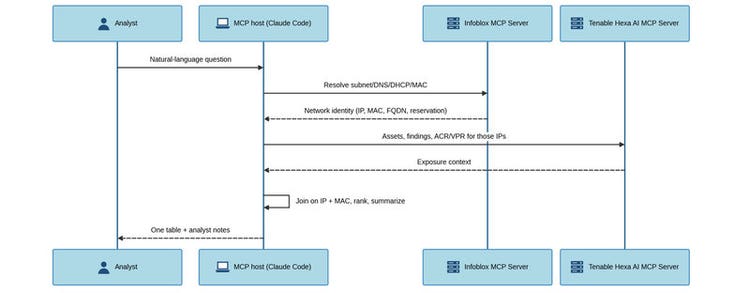
Figure 1. Architecture: Correlating Tenable vulnerability findings with Infoblox network identity
Use Case 1: Risk-Ranked Asset Triage across the Engineering Subnet
The first question is a familiar one: Which devices should we fix first?
Which devices in our engineering subnet have the highest asset criticality and active critical vulnerabilities? Rank using the findings index for active criticals rather than asset-level counters. For the top 5, look up each one’s network identity in Infoblox — DNS record, DHCP reservation and MAC. One table: hostname, IP, MAC per Tenable, MAC per Infoblox, identity status, ACR and the most serious active critical finding — prefer a named CVE over a rollup KB where one exists. Where Tenable has no MAC or hostname, mark identity “Infoblox-only”.
Claude started by resolving “Engineering Subnet” from Infoblox IPAM to 10.20.30.0/24, which matched 57 Tenable assets. It then counted active critical findings per asset directly from Tenable’s findings index instead of relying on asset-level counters, which can lag behind. It ranked assets by Asset Criticality Rating (ACR) first and used the active critical count to break ties. Counting from the findings index changed the result. Three assets with an ACR of 8 dropped out of the ranking because they had zero active critical findings. Tenable assigns ACR on a 1–10 scale based on what an asset is, such as its device type, business function and internet exposure, not on its vulnerabilities. A high-ACR asset with nothing critical to patch is important, but it isn’t the first thing to fix. For the top five, Claude pulled each device’s DNS A record, DHCP reservation and MAC address from Infoblox.
Table 1. Claude Code output showing the risk-ranked table for the engineering subnet
A ranked list is useful on its own. With network identity attached, it also tells the analyst what each risk actually means:
- The domain controller ranks fifth, but it may be the sharpest exposure. Because the ranking puts ACR first, ad-dc01’s ACR of 7, the lowest in the top five, places it last. Yet it has 65 active critical findings, nearly three times as many as any other asset in the table. They include Log4Shell, which allows unauthenticated remote code execution on the host that owns authentication for the whole engineering zone. A domain controller rated 7 is worth a second look. If its criticality is understated, it belongs at the top of the list.
- Both VMware management interfaces are reachable and unpatched. vc-mgmt01 (10.20.30.39), the vCenter Server that manages the virtual infrastructure, and hv-host01 (10.20.30.54), an ESXi hypervisor host, each have an open critical VMware advisory. An attacker who lands anywhere in the subnet can reach vCenter, and from there every guest it manages, including ad-dc01.
- srv-lnx08 is the identity gap to close. It has an ACR of 8, 23 active critical findings and unpatched PwnKit, but no Infoblox DNS record or DHCP reservation at all. Because it holds its address outside the IPAM system of record, it won’t appear in any address-based inventory or policy scoped from Infoblox.
The ranking is a starting point, not the final word. Infoblox tells you whether you can trust what you’re looking at.
Use Case 2: Identity Gap Analysis to Close Blind Spots with Infoblox
The second question flips the problem around. Instead of asking what is most vulnerable, it asks what the scanner can’t fully identify.
Which critical assets in the engineering subnet have no hostname or MAC address recorded in Tenable? For each, check whether Infoblox can supply that missing identity from DNS or DHCP. Show me a table of what each system knows.
Twelve assets in the subnet had no MAC address in Tenable, and nine of those also had no hostname or FQDN. By checking Infoblox DNS and DHCP, Claude closed the gap on six of them.
Table 2. Claude Code output comparing what Tenable and Infoblox each know about unidentified assets
The result goes past a data-quality report:
- All three of the highest-criticality unidentified assets are hypervisor management interfaces. Infoblox names two of them. The third, 10.20.30.26 (ESXi 9.0, ACR 8), doesn’t exist in either system. It’s a hypervisor with no owner, no name and no reservation, and it’s the one to chase first.
- 10.20.30.1 and 10.20.30.12 are almost certainly the subnet gateway and firewall. Those are the devices that define the blast radius, and neither system can attribute them.
- The pattern points to credential coverage, not data quality. Every one of the twelve assets is an unauthenticated scan target. That explains why Tenable has an OS guess but no hostname or MAC. Adding scan credentials for the ESXi and vCenter hosts would let Tenable resolve identity and improve finding fidelity in the same pass.
Use Case 3: MAC-to-Vulnerability Pivot from DHCP Reservation to Full Risk Posture
Investigations often start with a single identifier and nothing else. In this case, it was a MAC address.
Infoblox has a DHCP reservation for MAC 00:50:56:b1:2d:9e. Work out which device that is, then pull its full vulnerability posture from Tenable.
In eight tool calls, Claude traced the device end to end. The MAC address matched a single DHCP fixed-address reservation in Infoblox: srv-app02, holding 10.20.30.56 in the Engineering Subnet. A forward DNS A record confirmed the mapping. The same IP then resolved to a Tenable asset running Windows Server 2019 Standard. With an ACR of 9, it’s the highest-criticality asset in the subnet, and it has never had an authenticated scan.
Table 3. Claude Code output tracing the MAC address through Infoblox to the device’s Tenable posture
Starting from one network identifier, the analyst ends up with a remediation plan:
- About two years of Windows patching is missing on an ACR-9 host. The missing critical rollups run continuously from June 2024 to August 2026. This isn’t a single missed Patch Tuesday. The host has drifted out of the update cycle entirely.
- Eighteen of the 21 critical findings have resurfaced rather than appearing for the first time. That points to the host being reimaged or rolled back to an old snapshot, not to a one-off patch failure. It’s worth confirming before spending more effort on remediation.
- MongoBleed is the finding to act on first. It can be triggered remotely before authentication and was verified directly. That makes it more urgent than the Windows backlog, even though it’s rated High rather than Critical.
Why Infoblox and Tenable Are Better Together
The same three patterns show up across all three conversations.
- Authoritative and always-up-to-date network identity is the join key. Authoritative DNS, DHCP and IPAM data turns a list of vulnerable IP addresses into a list of known devices with names, owners and reservations.
- Gaps are findings too. A critical asset that’s missing from IPAM, or a hypervisor that neither system can name, is a security issue in its own right.
- Context changes priority. Correlated data showed when a High-severity finding should come before a stack of Criticals, and when a backlog of resurfaced findings points to an imaging problem rather than a patching problem.
These MCP-enabled workflows shown here complement the existing Infoblox and Tenable integration, but they don’t depend on it. Customers who have deployed that integration configure their Infoblox NIOS Grid or Universal DDI™ to send information about new network devices and malicious events to their Tenable environment. Once it’s set up, those events can trigger scans automatically, give near–real-time visibility into new devices as they join the network and support selective scanning based on assets. The MCP workflows work differently. The AI assistant connects directly to the Infoblox MCP Server and the Tenable Hexa AI MCP Server and queries both at the moment a question is asked. That means no outbound notification templates, endpoints or Security Ecosystem license are required, and the two products don’t need to be connected to each other. Teams that already run the event-driven integration get an on-demand investigation layer on top of it. Teams that don’t can still ask questions that span both platforms without waiting for a dashboard or writing a script.
From Questions to Answers in a Single Conversation
Vulnerability data is most useful when it’s anchored to an authoritative view of what’s actually on the network. By making Infoblox DNS, DHCP and IPAM data available to AI assistants through MCP, security teams can correlate exposure with identity on demand. They can find blind spots that neither tool shows on its own and go from a single question to a prioritized, defensible action plan in minutes instead of hours.
The AI assistant does the stitching. Infoblox and Tenable supply the authoritative facts.
Learn More
- Read about Infoblox IQ™ and the Infoblox MCP Server.
- Explore the Infoblox-Tenable integration on the Infoblox Security Ecosystem page.
- Visit the Ecosystem Portal to discover certified Infoblox integrations.
- If you’re already a customer, your account team can walk you through these workflows in your own environment.
- GitHub link on github.com/infobloxopen/infoblox-tenable-mcp-use-cases.