- infoblox:blogs/category/networking
Top Security Report #2: Malicious Activity by Client
This blog discusses the report #2 in a series of seven top security reports that can help you defend against bad actors.

The Brief
This blog discusses the report #2 in a series of seven top security reports that can help you defend against bad actors.
Here are the previous parts: part 1, part 2, part 3, part 4, part 5, part 6
Malicious Activity by Client
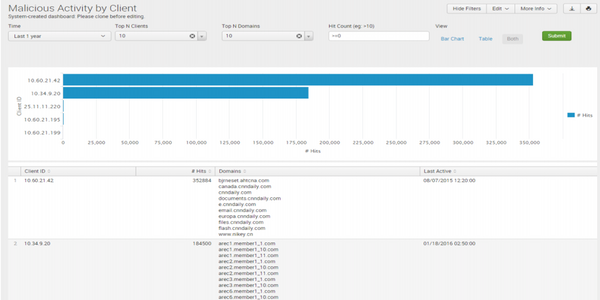
Our top #2 report drives data protection and malware mitigation by showing which clients have the most malicious activity on the network based on threat intel RPZ rules defined through Active Trust. Networkadmins need to know which clients are engaged in network service-impacting behavior, so they can monitor and block them if needed. Security admins use this report to discover which devices are infected with malware and are leveraging the DNS attack vector so that they can take pre-emptive action. A common security use case occurs when a device is known to have been compromised in the past, so this report is used to determine which real-time and historical malicious activities are linked to the device. It’s especially helpful to see how far back a device has been infected to identify the related impact and take corrective action.
This report is found under the security dashboard and requires Active Trust/Active Trust Cloud. Filters include time, top Number of clients, top Number of domains, hit count and data views by bar chart, table or combined. By selecting the client ID, admins can drill down to see the number of hits, domains impacted and the last active date/time stamp for deeper forensic insights. Admins can often also identify the malware based on the domains associated with the client, so there is a lot of intel and insights available through the Malicious Activity by Client report.
Here are the seven (7) security reports that can give you an edge over the bad actors.
- Top Security Report #7: DNS Top NXDOMAIN – NOERROR
- Top Report #6: Threat Protection – Top Rules by Source
- Top Report #5: Top Malware & DNS Tunneling by Client
- Top Report #4: Tunneling Traffic by Category
- Top Report #3: DNS Top Tunneling Activity
- Top Report #2: Malicious Activity by Client
- Top Report #1: DNS Top RPZ Hits
Learn more:
- Join the Infoblox Reporting & Analytics Technical Demo Series to continue the discussion in the free webinar on 7/17, 2018, 9A PDT, 12P EDT, 5P BST. Register
- As an existing Infoblox DDI customer, you can deploy a virtual Infoblox Reporting & Analytics appliance free of charge — no strings attached. Download and try the Reporting & Analytics Free Tier today.